Showing posts with label Katmai. Show all posts

Tuesday, May 19, 2009

Spatial Demo Goodness

If you’re someone who presents on SQL Server topics, you have probably run into something of a wall when it comes to getting interesting spatial data sets to demonstrate. The spatial data included with the SQL Server 2008 sample databases is functional, but not particularly complex or interesting. There is free spatial data available for many different sources online, but it tends to be difficult to find, in different formats, and annoyingly difficult to load into SQL Server.[1] And of course, the not-free spatial content out there tends to be really, really not-free, and while it may make sense to pay a premium price if you are developing premium software, but for demo purposes this is generally a non-starter.

Enter GeoNames.

GeoNames is an open source provider of spatial data. Essentially they have many disparate sources of free spatial content and have aggregated them into a single location, with many different access methods. They support web service access (and publish a nice set of client libraries too) which is nice for direct application integration, but to me the cool factor comes from the ability to download text dumps of the whole database or just the countries you want. Because then you can load the data into SQL Server 2008 and let the demo goodness begin.

And Ed Katibah, PM for the SQL Server spatial team, has posted instructions for loading GeoNames data into SQL Server 2008. It’s great to have these steps documented because there are quite a few of them, but hopefully you’ll only need to perform them once.

So if you have been waiting for great spatial data that’s available for free, wait no longer.

I should also point out that I became aware of this cool resource not based on my own hard work and research, but instead because of the excellent Simple Talk newsletter that Red Gate Software produces. And I should probably mention that the primary reason I blogged about it is that my friend and colleague, senior SQL Server trainer and all-around good guy Chris Randall has been working on building better spatial demo sets, and I’ve heard rumors that  he occasionally reads this blog. Hopefully this will save him (and you, and me) some work…


[1] Please keep in mind that I don’t claim to be a SQL Server spatial expert, so what is “annoyingly difficult” for me may be “exceptionally simple” for someone with more experience, but it likely to be “annoyingly difficult” for many people.

Wednesday, December 31, 2008

Christmas Came Late!

Santa has just delivered the gift that many SSIS developers have had on their Christmas lists: more samples and options for programmatically building SSIS packages. Although in this case, the role of Santa is played by Matt Masson of the SSIS team, who must have gained quite a bit of weight since the last time I saw him. Matt posted seven new articles on his blog yesterday, including this index post here: http://blogs.msdn.com/mattm/archive/2008/12/30/samples-for-creating-ssis-packages-programmatically.aspx

There are samples for building a package with a data flow task, and for adding OLE DB Source and Destination components, adding the ADO.NET Source component, adding a Row Count transformation and adding a Conditional Split transformation. Each post includes nicely commented C# code, and each one goes a long way towards filling the documentation gap around the SSIS data flow API.

And if that's not exciting enough, Santa was just getting started. Evgeny Koblov, a tester on  the SSIS team has gone far beyond simply it easier to work with the less-than-intuitive COM API exposed by the SSIS data flow. He has built a better API. It's called EzAPI and you can read about it on Matt Masson's blog here: http://blogs.msdn.com/mattm/archive/2008/12/30/ezapi-alternative-package-creation-api.aspx. You can also download it and start using it on the CodePlex web site here: http://www.codeplex.com/SQLSrvIntegrationSrv/Release/ProjectReleases.aspx?ReleaseId=21238

EzAPI is probably the most exciting thing I've seen coming into the world of SSIS since the release of SQL Server 2008, if not before. It's essentially a native .NET wrapper around the underlying COM API, which doesn't sound particularly interesting at first glance, but since it delivers the ability to quickly and easily build SSIS packages and data flows through code, it's sure to be a time-saver (if not life-saver) for many SSIS developers.

Now please excuse me while I download EzAPI and start to play...

Monday, December 15, 2008

Changes in SQL Server 2008

MCT Russ Loski recently shared this great link with the SQL Server trainer community:

http://msdn.microsoft.com/en-us/library/cc280407.aspx

This is the top-level "Backward Compatibility" topic from SQL Server 2008 Books Online, and includes sub-topics for the DRBMS, SSAS, SSIS, SSRS and replication, covering deprecated features, behavioral changes, breaking changes and more.

If you're looking into what's new and different (and what might bite you if you're not careful) with SQL Server 2008, this is a great place to start. Thanks, Russ!

Wednesday, December 10, 2008

"Bonus" Technical Deep Dive Session at the MCT Summit - Redmond and Prague

The vast majority of the content at the 2009 MCT Summit events is heavily weighted toward the IT Professional audience. This is largely due to the fact that the major developer and database product releases took place in 2007 and 2008, while there are significant releases in-flight for Windows and Exchange Server. But I believe there should still be some deep technical content for at least one underrepresented trainer audience: the BI developer.

So I'm going to fill in this gap by presenting an "off the schedule" technical deep dive on SQL Server Integration Services. I did something similar at the 2008 Redmond summit and it was very well received, so I'm going to model the 2009 Summit session on the same model. Here's the deal:

“Everything You Ever Wanted to Know About SQL Server Integration Services but Were Afraid Your Students Would Ask”

In this technical “deep dive” session, Matthew Roche will take attendees on a wild and sometimes horrifying ride into the dark underbelly of real world SSIS development that existing SSIS books and courseware doesn’t effectively cover, including development and deployment best practices, data flow internals and performance tuning and more. But be warned – there will be no fixed agenda for this session! The topics covered will be driven by attendee involvement, so the more questions you bring to the session the more everyone will get out of it. If you teach (or fear you may be asked to teach) the SSIS courses for SQL Server 2005 or SQL Server 2008, this is a session you don’t dare to miss.

Does this sound interesting to you?

If you are attending either event (Prague or Redmond) and would be willing to attend this session after the summit sessions end one day[1] then please reply here[2] to express your interest. If anyone (even one attendee) is interested then I will come prepared to spend as much time as necessary (I think we ran around three hours at the 2008 Summit in Redmond) to give each attendee everything he needs. So speak now or forever hold your data...

[1] This is a key point, as it will mean skipping on some other planned after-hours event, I'm sure.

[2] Or in the microsoft.private.mct.mctsummits newsgroup.

Wednesday, October 29, 2008

SQL Server 2008 - Free with Classroom Training

Talk about synchronicity - the old and the new have come together with a great big bonus for SQL Server professionals who are seeking training on SQL Server 2008. Microsoft Learning[1] is teaming up with the SQL Server[2] team to give away free copies of SQL Server 2008 Standard Edition to people who attend instructor-led classroom training at a Microsoft Certified Partner for Learning Solutions (CPLS). Here's the deal:

1) Attend one of these classes at a participating CPLS between December 10, 2008 (when the courses start to become available) and June 30, 2009:

  • 2778 - Writing Queries Using Microsoft® SQL Server™ 2008 Transact-SQL
  • 6158 - Updating Your SQL 2005 Skills to SQL Server 2008
  • 6231 - Maintaining a Microsoft® SQL Server™ 2008 Database
  • 6232 - Implementing a Microsoft® SQL Server™ 2008 Database
  • 6234 - Implementing and Maintaining Microsoft® SQL Server™ 2008 Analysis Services
  • 6235 - Implementing and Maintaining Microsoft® SQL Server™ 2008 Integration Services
  • 6236 - Implementing and Maintaining Microsoft® SQL Server™ 2008 Reporting Services
  • 6317 - Upgrading Your SQL Server 2000 Skills to SQL Server 2008

2) Get SQL Server 2008:

  • SQL Server 2008 Standard Edition – Full software
  • 1 Client Access License (CAL)
  • 32 bit, 64 bit and IA64 versions included
  • Software will be English only at this point

Pretty simple, right? There are a few minor gotchas, but please don't let these stand in your way:

  • Each CPLS will decide whether or not they participate in this promotion campaign, so talk to your local CPLS and make sure they know about it and that they are participating.
  • This offer is only good while supplies last. Plan your training early!

And that's that. Call your local CPLS today and ask about SQL Server 2008 training. Tell them Matthew sent you. [3]

FreeSQL2008

[1] This is the "new" part - I joined Microsoft Learning as a Senior Program Manager earlier this month, although I cannot take any credit for this cool promotion.

[2] This is the "old" part - I've loved SQL Server since forever.

[3] And no, I don't get any kickbacks. How unfair is that? ;-)

Tuesday, October 14, 2008

T-SQL Fundamentals is (Almost) Here!

Not too long ago I posted about Itzik Ben-Gan's excellent book Inside Microsoft SQL Server 2005: T-SQL Querying and how valuable I've found it. Well, Itzik has just completed work on his next book: Microsoft SQL Server 2008 T-SQL Fundamentals.

This is a book for people who are new to SQL programming, which is an audience that Itzik has not tackled before. Now you might think that for someone who knows more about T-SQL that anyone else in the world, writing a beginners' book should be about as difficult as sleepwalking, but this is not the case. In a recent post to the private SQL Server newsgroup for MCTs[1] Itzik had this to share:

“I always wanted to write a book about T-SQL Fundamentals, but kept postponing it until I felt I acquired enough knowledge and teaching experience to write it. Well, you never feel you have enough knowledge especially with a language and a model that are so deep, but at least enough to make a decent effort. Some may think that writing a Fundamentals book is easier than writing an advanced one, but I think it's actually the other way around, especially with SQL. Target audience for advanced books is less prone to be misled and mainly need their gaps to be filled. It's a big responsibility to teach people fundamentals, and that's one of the reasons I waited so long.”

How cool is that? Even though I don't think I'm the target audience for this book, I am definitely going to get a copy. As a trainer I'm always looking for better ways to explain core concepts, and T-SQL has enough difficult concepts that I am sure to pick up a pointer or two (or two hundred) from this book.

The book is scheduled to be released on October 22 and you can pre-order it today. So what are you waiting for?

[1] Yes, I asked his permission before posting this quote here. ;-)

Thursday, August 28, 2008

New SSIS Article Online on MSDN

I have a new article on the SSIS Developer Center on MSDN, focusing on Data Sources and Configurations as tools for connection reuse across sets of SSIS packages. I wrote it months ago (looking at it now it seems even longer[1]) but it just made it online today.

Check it out here: http://msdn.microsoft.com/en-us/library/cc671619.aspx

This is actually one of a set of articles by SSIS-focused SQL Server MVPs that will be published over the next week of so - I just could not wait to let people know that it was out there. I'll post links to all of the articles once they're all online (and I probably won't be the only one to do so) but for now you can get started with this one. Enjoy!

[1] For example, the "about the author" blurb at the bottom lists me as still working at Configuresoft, even though I have not been working with Configuresoft since the end of July.

Wednesday, August 27, 2008

VDUNY Meeting Tonight

Just as a quick reminder, I will be presenting on new features in SQL Server 2008 at the Visual Developers of Upstate New York user group tonight at 6:00 PM in Rochester, New York. If you're in the Rochester area, be sure to attend.

And remember - as an added bonus I will be giving away a set of post-conference DVDs from this year's TechEd conference. This is a set of nine DVDs with all of the breakout sessions and keynotes from both the TechEd Developers and TechEd IT Professionals conferences, with a retail value of $195. It could be yours!

One More Reason to Attend

I've posted a few times already[1] about the SSWUG Business Intelligence vConference that I have been helping to organize. Well, the conference is now less than a month away, and there is more news to share:

We're giving away a copy of Microsoft Visual Studio Team System 2008 Team Suite with MSDN Premium to one lucky attendee.

That's right - the big one. This is the ultimate version of Microsoft's MSDN subscription, with a suggested retail price of $10,939. If you're a software developer or BI professional, this package has everything that you need to develop for the Microsoft platform, and then some.

If you'd like a chance to win this MSDN subscription, just register for the SSWUG Business Intelligence vConference. For just $100 you get:

So what are you waiting for? This vConference is going to be amazing, and we'd love to see you there!

[1] For example:

Tuesday, August 26, 2008

SQL Server Sample Install Epiphany

(Warning - this post has turned into a long drawn-out rant. If you want to skip to just the useful stuff, scroll down to the third and final bulleted list way down there at the bottom. I won't mind, I promise.)

One "new feature" of SQL Server 2008 that has always seemed of dubious value (at best) to me is the way that the product samples have been removed from the actual SQL Server installer. If my memory serves me correctly[1] the history of SQL Server samples (namely the sample databases) has gone something like this:

  • SQL Server 2000 and earlier: Sample databases automatically installed with the RDBMS. Users must manually delete them post-install if they're not wanted.
  • SQL Server 2005: Sample databases part of RDBMS install, but are not installed by default - they must be manually selected by the user.
  • SQL Server 2008: Sample databases not included with the RDBMS installer at all. Users must wade through dozens of poorly-documented downloads on the CodePlex web site, hope they get the installers that include the databases that they need, install them, then struggle to find out what files the installers put where.

Ok, so perhaps that last bullet isn't particularly fair[2] but it does sum up my personal experiences with getting samples working with SQL Server 2008. If you go to the Releases page for the SQL Server 2008 samples project on CodePlex you'll see 28 (twenty eight!!) different MSI installers that you can download. And when you install any one of them, it's pretty much a mystery what files are installed and where you can find them. In my book this is quite a big step backward.

To be completely open, I realize and admit that I'm not the typical SQL Server user. I do a lot of training, presenting and writing on SQL Server topics, and the samples are a big part of these activities - because without them I'd have to build samples of my own. And of course once the SQL Server samples are installed, they're great - it's hard to find anything bad to say about the content itself.

Anyway, today I've been spending some time preparing for a few presentations that I have on my schedule in the next month or so, and have needed to go back out to the CodePlex web site to download (again) the SQL Server 2008 samples. When I was faced (again) with the 28 (twenty eight!) different installers, I groaned and hung my head. "Why?" I moaned, "Why can't they just give us the expletive expletive SQL scripts and source code instead of these accursed MSI files?!?!?"

Oh.

Oh yeah.

Oh yeah, one of the installers is named "SQL2008.AdventureWorks_All_DB_Scripts.x86.msi" - that sounds useful. How could I have missed this?

In fact, I've found that to get to where I need to be, there are really only two things I need from CodePlex:

  • That SQL2008.AdventureWorks_All_DB_Scripts.x86.msi file, which you can get here.
  • The "All Microsoft Product Samples in a Box" download, which includes "all Microsoft SQL Server product samples (except for the sample databases, due to size constraints) and does NOT include any community projects" and which you can get here.

The nice thing about this second download is that you can choose to download it as a zip file, which means you can extract it to wherever you want to put it. And that, for me, is key.

The DB installer MSI is another matter entirely. When you install it, there is no indication of where it's putting the DB scripts, nor does it give you the option to choose a destination directory. I looked in the C:\Program Files\Microsoft SQL Server\100\Samples folder - that makes sense, right? Wrong. There's nothing there but a license, a readme file which references the C:\Program Files\Microsoft SQL Server\100\Samples folder where the samples aren't located, and a shortcut to the CodePlex project.[3] Ugh.

Instead, the samples are installed in the C:\Program Files\Microsoft SQL Server\100\Tools\Samples folder (note the inclusion of Tools in the folder path) where, if you're like me, you'll never think to look.

Ok, this post has turned into a rant, which was really not my intent. Please let me summarize:

To get the complete samples for SQL Server 2008, perform the following steps:

Hopefully this will help someone out there avoid the frustration I've felt from time to time when working with the "decoupled" samples...

[1] If you say this in the voice of Chairman Kaga it sounds like a cool pop culture reference, instead of just an admission that I have trouble remembering things that happened before I started typing this blog post - try it out and you'll see!

[2] Especially seeing the huge improvements that the samples owner David Reed has made over the last few months leading up to SQL 2008 RTM.

[3] No, I have not yet filed a Connect item on this readme file. Typing up this rambling blog post took so long that I didn't have time to actually file a useful bug as well...

Thursday, August 21, 2008

Visual Developers of Upstate New York

I apologize for the late notice (I've know for weeks, but have kept forgetting to post) but I will be speaking next Wednesday, August 27th, at the VDUNY user group in Rochester, New York. This user group meets on the 4th Wednesday of each month in the Rochester Microsoft offices, and generally has a great turnout of talented software development processionals.

This month I'll be presenting on some of my favorite new developer-centric features in SQL Server 2008. I realize that this is awfully vague, but that is intentional. I'm planning on going in with a loose agenda and lots of demos, and seeing where the session goes.

And to sweeten the pot a little, I will also be giving away a complete set of nine DVDs with all of the content from the TechEd Developers and IT Professionals conferences in Orlando this June. If you're in the Rochester area, you should plan on attending - it will be a lot of fun.

Wednesday, August 20, 2008

SSIS in Stockholm 2.0

Last autumn I visited the beautiful country of Sweden for the first time. I delivered a two-day SQL Server Integration Services "advanced topics" seminar in Stockholm and presented at the Swedish SQL Server User Group one evening as well.[1] I had a great time and based on their evaluations the seminar attendees did too.

So we're doing it again.

On October 1 and 2, I will be back in Stockholm for another SSIS seminar. The outline looks like this:

  • SSIS development best practices
  • SSIS deployment best practices
  • Extending SSIS packages through custom .NET code using the Script Task and Script Component
  • Using open source tools to enhance the SSIS development lifecycle
  • Building a custom configuration solution to move beyond the built-in configuration features
  • "Elegant solutions for common problems" utilizing SSIS expressions to build real-world packages
  • Adding data mining to your SSIS packages
  • Performance tuning the SSIS data flow
  • New SSIS features in SQL Server 2008
  • Lots of opportunities for Q&A and real-world SSIS discussion

It's always a real joy for me to speak on my favorite topic (SSIS) and this seminar is going to be doubly exciting. Not only do I get to return to Stockholm, I also get two full days to present on some of my favorite subjects, do lots of hands-on demos, share some cool code, and above all share my passion and excitement for the SSIS platform with everyone involved.

So if you're going to be in Stockholm at the beginning of October, you should definitely plan on attending this event. And if you're not going to be in Stockholm, you should plan on coming anyway. The city is beautiful this time of year, the food is amazing, and the seminar content will be even better.

[1] I also had some of the best food I've ever eaten, got to explore a truly beautiful city, and meet some really nice people.

Building Packages Programmatically...

...just got easier.

One of the most common SSIS questions that most consistently gets the most consistently frustrating answers is "how do I build a package that can load data from an Excel spreadsheet into a database table when I don't know the layout of the spreadsheet until run time?"

No, the question is never phrased quite this succinctly, but there are dozens of variations that all boil down to this core. The source may be a text file or a database table and not an Excel spreadsheet, but the "I don't know the schema until I run the package" or "the source columns map directly to the destination columns, but I don't know exactly what they are" aspects of the question remain the same.

And the answer remains the same too: "SSIS doesn't do 'dynamic' data flow. You can work around this limitation by using the SSIS .NET API to dynamically build and execute a package, reading in the metadata about your source and destination columns to construct the data flow."

The problem with this answer is threefold:

  1. The API for working with the SSIS data flow is a bit complex.
  2. The documentation on the SSIS data flow API is a bit sparse.
  3. The samples available that demonstrate this technique are a bit nonexistent.

This triumvirate of frustration has been a pet peeve of mine for quite some time. In fact, I've been known to say that such a frustrating answer to such a common question is a major barrier to the adoption of SSIS.

But this week the story just got better. The SSIS team has released additional functionality (see Matt Masson's blog post for more details on the new functionality, including SharePoint List Adapters!) as part of their SSIS Community Samples project on CodePlex. As part of the new release, the samples now include a package generation application that demonstrates how to solve this archetypal problem. Here's the intro blurb from the readme file for this sample:

"This sample demonstrates package generation and execution using the Integration Services object model. The sample can be used to transfer data between a pair of source and destination components at the command line.


The sample supports three types of source and destination components: SQL Server, Excel and flat file. You can choose to create a new destination based on the source component metadata. Alternatively, this sample supports mapping source and existing destination columns by using the same column names or manually, by using the command line.

You can modify the code in this sample to fit your own application."

This may not sound exciting when you read it, but it almost takes my breath away. Digging into this sample is high on my to-do list in the weeks ahead (July and August have been crazy months for me, as the lack of activity on my blog demonstrates) and if you have ever been faced with this "dynamic data flow" conundrum, you should check it out as well.

Wednesday, August 6, 2008

SQL Server 2008 is Released to Manufacturing!

SQL Server 2008 went RTM this morning and is currently available from the MSDN and TechNet Subscriber download centers. I'm downloading now - are you?

I assume you're not, since I'm getting a sustained download rate of over 2100 KB/sec. Maybe I should wait until my download is complete to hit "Publish." ;-)

Wednesday, July 23, 2008

SSIS Community Samples on CodePlex

The SSIS team has just published the first two of a set of community samples to the CodePlex site. Take a look here: http://www.codeplex.com/SQLSrvIntegrationSrv

The exciting thing is that these samples include both a binary redistributable and source code, so you can use them as-is if they serve your needs, and customize them if they only get you part way to your destination. The first two samples are an XML Destination component (this is an oft-requested data flow destination, so this is probably going to be the big crowd pleaser) and a Regular Expression Flat File Source component that provides many capabilities above and beyond the built-in Flat File Source.

You can check out the features on the release page here: http://www.codeplex.com/SQLSrvIntegrationSrv/Release/ProjectReleases.aspx?ReleaseId=15424

Enjoy!

Saturday, July 5, 2008

Check Out This Lineup!

I've posted before about the Business Intelligence Virtual Conference I'm helping to organize. Even though I have not had much to say about this exciting event in the last few weeks, this doesn't mean that I haven't been feverishly busy making sure that the conference will be great. We're still finalizing the session schedule, but we have the speaker list nailed down[1]. Check this out:

  • Donald Farmer: Donald is the Principal Program Manager for SQL Server Data Mining at Microsoft and was the Program Manager for SQL Server Integration Services for the SQL Server 2005 RTM release. Donald is always a much sought-after and highly rated speaker, especially when he's talking about his favorite topics like data mining and fish farming.[2]
  • Brian Knight: Brian is a SQL Server MVP and the author of multiple books on SQL Server Integration Services. He's presented regularly at major conferences like TechEd and PASS, and is a great speaker all around.
  • Ted Malone: Ted is a Visual Studio Team System MVP, but knows more about the Microsoft BI stack than most SQL Server MVPs I know. Ted is also a great speaker who has presented at various conferences on lots of SQL Server related topics.
  • Matt Masson: Matt is a developer on the SQL Server Integration Services team at Microsoft, and worked at Cognos before joining Microsoft. As an SSIS insider, Matt has great insight into the inner workings of the product, and will be sharing them during his sessions.
  • Sonya McNeal: Sonya is a Microsoft Certified Trainer and consultant who specializes in the Microsoft BI stack. She presented some of the highest rated instructor led labs at the TechEd conference in Orlando this June, and will be bringing her many years of training and presenting experience into play for the virtual conference.
  • Scot Reagin: Scot is a SQL Server MVP and a mentor with Solid Quality Mentors with more than 20 years experience in the database and BI field. Scot has presented at many major conferences including TechEd, PASS and SQL Connections.
  • Matthew Roche: If you're reading my blog hopefully you have some idea who I am, but just in case, I'm a SQL Server MVP, MCT and experienced BI speaker and consultant. I'm honored to be the conference chair for this conference, and will be doing everything in my power[3] to ensure that this conference sets the bar for BI conferences to come.
  • Craig Utley: Craig is a mentor with Solid Quality Mentors, and used to be a Program Manager on the SQLCAT team at Microsoft and is the author of several books. These guys are the best of the best - they're the ones that get called in when no one else can solve the problems. Craig is also a regular presenter who can make even the most complex BI topics easy to understand.
  • Erik Veerman: Erik is a SQL Server MVP and a mentor with Solid Quality Mentors who has co-authored several books on SQL Server Integration Services and is responsible for the SSIS ETL best practices in Microsoft's Project REAL. Erik is a regular author and presenter on all facets of the Microsoft BI stack.
  • John Welch: John is a SQL Server MVP and is the Chief Architect at Mariner, where he is responsible for the full end-to-end Microsoft BI stack. John is an experienced presenter with deep insight into all of Microsoft's BI products.

What an amazing lineup - I can't adequately express how excited I am to be working with this team. Each speaker will be presenting three sessions (and I'm just as excited about the session list as I am about the speaker list - I can't wait to share it with you) for a total of 30 sessions plus three keynote presentations - one for each day of the conference.

And remember - the entire virtual conference is just $100 for the full three days, and as I mentioned in an earlier post, if you attend the virtual conference you also get a $150 discount off the Dev Connections Fall 2008 Conferences this November in Las Vegas.

How could it get any better than this?

[1] As of this writing, the speaker list on the conference web site isn't complete - we're still waiting on a photo from Matt Masson, but everything else is there.

[2] Don't ask. Trust me. ;-)

[3] And of course, because I listen to Manowar, my power is pretty much limitless.

What Happens in BIDS, Stays in BIDS

That's right - it's time to start planning for the Fall 2008 SQL Server Connections Conference in Las Vegas. It's going to be held at the Manadalay Bay Resort and Casino from November 10th through November 13th, and there are lots of excellent sessions scheduled. In fact, I will be delivering two SQL Server Integration Services sessions:

SQL Server Integration Services Development Best Practices
Are you tired of feeling like you’re making the same mistakes over and over again? Would you like to have a roadmap that outlines the pitfalls you’re likely to encounter when building ETL solutions with SSIS? Then this session is for you! You’ll learn how to get the most from the SSIS tools and platform through a set of SSIS development best practices from a battle-scarred database and BI consultant who has survived the rough projects and lived to tell the tale.

SQL Server Integration Services Performance Tuning and Optimization
SSIS packages have many capabilities, from control flow to event handlers to scripting. But the SSIS data flow is where the decisions you make will have the greatest impact on the performance of your packages. In this session, you’ll learn what’s going on under the hood in the SSIS data flow pipeline, and how to take advantage of that knowledge to make your packages perform better. You’ll also learn general tips and tricks to improve SSIS package performance and how to get the most out of your packages.

Sound like fun? Well, it gets even better!

Do you remember the Business Intelligence Virtual Conference I mentioned a few weeks back? I'll post more information about the virtual conference once we get the session schedule finalized, but for now you should know that if you attend the Business Intelligence Virtual Conference - $100 for three days worth of amazing content - you will get a $150 discount for the Fall SQL Server Connections conference.

How cool is that? If you're planning on attending the SQL Server Connections conference (or any of the Dev Connections conferences being held at the same time, because a ticket to one gets you admission to all of them) then we're essentially paying you $50 to attend the Business Intelligence Virtual Conference. That's like $50 better than free, which in my book is pretty darned cool.

So start planning now, and I'll look for you in Las Vegas!

Thursday, June 19, 2008

New SSIS Project Templates in RC0

I've finally found the time to install SQL Server 2008 RC0 (although my SSIS/BIDS install is corrupted so I have not been able to run SSIS in RC0 through its paces) and noticed something interesting. I was creating a new C# project and noticed this:

NewProjectTemplates

Do you notice the two new project templates in the tree view on the left? That's right - Microsoft has added new class library (DLL) templates for creating custom Control Flow tasks and Data Flow components in C# and VB.NET. It's pretty unlikely that SSIS component development will ever approach the ease of use of the Script Task and Script Component, but having a Visual Studio project template that sets up much of the component plumbing is a nice step forward.

UPDATE: Upon further reflection (and a very helpful email) it turns out that these project templates are not designed for SSIS component developers. They are instead (as the project names should have clued me in, were I not so excited over my discovery) the templates that are used by Visual Studio Tools for Applications (VSTA) in the Script Task and Script Component inside a package. When you add a new Script Task or Script Component to your package, VSTA creates a new instance of one of these templates.

Tuesday, June 17, 2008

Did you Miss PacMan?

At the Microsoft TechEd conference in Orlando earlier this month I mentioned my PacMan project on CodePlex to several different audiences, including during each of my breakout sessions. PacMan is my "SSIS Package Manager" utility that I've built in C# to make my own life easier, but enough people expressed interest in it that I shared the utility online with hopes that it would make their lives less painful as well.

Well, although I may have succeeded to some extent, the very nature of PacMan probably limits its analgesic potential. This is because PacMan is:

  • A "rough and dirty" development utility. This is code that I, as a developer, wrote for myself, as a developer, to use. This means that I was focused on solving short-term tactical goals, and not on building a general-purpose reusable framework for solving longer-term strategic goals. To put this another way, I expected to have to go in to PacMan and write a little code any time I wanted it to do something; I didn't have the time, energy or inclination to write all of that code up front.
  • Largely undocumented. Other than the source code itself, there is little help for developers who want to start using PacMan for their own purposes.

Sadly, my schedule is highly unlikely to allow me to address the first point at any time in the foreseeable future. PacMan will likely always remain a "rough and dirty" utility, because the same work that keeps it valuable to me also keeps me too busy to refactor and refine it into something better.

But the second bullet is something I am likely able to do something about sooner rather than later. In fact, I plan on doing a little something about it today. Right now. Right Here:

PacMan Overview:

The whole point of PacMan is to perform batch operations on groups of SSIS packages. That's it. Because SSIS does not provide any built-in features for working with multiple packages at one time, this was something that I felt was sorely needed. Specifically, I needed a way to add a new variable to close to 100 packages. Obviously manually updating the packages wasn't an option, so PacMan was born.

The PacMan utility is implemented in a Visual Studio solution with two projects: a Class Library (DLL) Components project and a Windows Forms UI project:
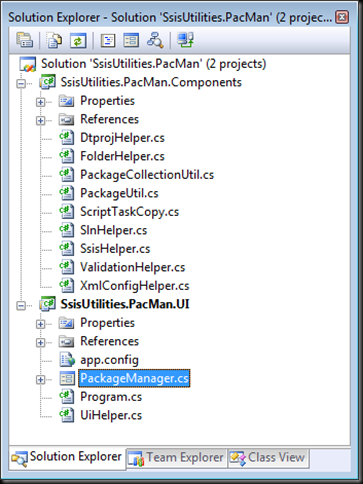
Figure 11

The Components project implements a small set of classes that encapsulate access to objects in the SSIS .NET object model. The PackageUtil and PackageCollectionUtil classes are the two most significant ones, as we'll see later on.

PacMan UI:

The PacMan UI is exceptionally simple.[1] At the top of the form there are four options for selecting the scope of operations for whatever work is going to be performed - a single package, a single Visual Studio project, a Visual Studio solution containing one or more projects, or a file system folder containing multiple subfolders and packages. At the bottom of the form there is a set of tabs; each tab contains data entry controls for initiating a specific operation that will be performed on the packages that are in scope.
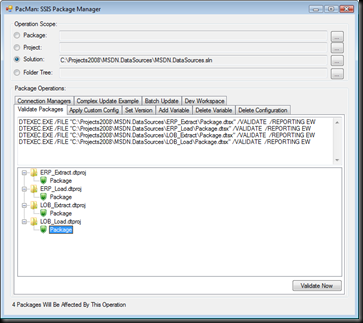
Figure 10 

PacMan Components:

As mentioned above, the two main classes in the Components project are the PackageUtil and PackageCollectionUtil classes.

The PackageUtil class is essentially a thin wrapper around a Microsoft.SqlServer.Dts.Runtime.Package object. The PackageUtil class exposes a Package object through its SsisPackage property, and also exposes a set of properties and methods that make manipulating the package more straightforward.

The PackageCollectionUtil class is a List of PackageUtil objects, along with a set of properties and methods for manipulating the packages in the List.

When an operation scope is selected through the PacMan UI, an instance of the PackageCollectionUtil class is created and stored in the class-level packages variable which is in scope and available anywhere within the PacMan UI.

Most interesting scenarios in PacMan revolve around enumerating the packages collection and doing something[2] with each of the packages it contains.

Using PacMan:

The basic pattern of using PacMan goes something like this:

  1. Get the PacMan code from CodePlex and open it in Visual Studio.
  2. Add your own code to PacMan. You can do this either by adding a new tab to the UI or reusing an existing tab. There is an existing "Dev Workspace" tab that I use for experimenting or for one-off efforts when I don't want to be bothered building a UI for what I'm working on.
  3. Feel good about accomplishing so much with so little effort.

Ok, so it may not be quite that simple all the time, but that's all I can think of right now. The nice thing is that the packages collection takes care of most of the hard work - all you need to do is worry about working on a single package at a time and PacMan does the rest of the work.

PacMan Use Case Example 1:

A typical example of using PacMan may look like this. The code below is used to rename a connection manager in all selected packages:

private void buttonSample_Click(object sender, EventArgs e)
{
    string oldName = "LocalHost.AdventureWorksDW";
    string newName = "AWDW";

    foreach (PackageUtil p in packages)
    {
        if (p.SsisPackage.Connections.Contains(oldName))
        {
            p.SsisPackage.Connections[oldName].Name = newName;
        }
    }
    packages.Save();
}

It doesn't get much simpler than that, does it? Imagine trying to reliably rename objects across a project or solution that contained dozens or hundreds of packages.

PacMan Use Case Example 2:

Some operations may require more code that what was shown above. For example, I recently needed to review a set of several hundred packages to ensure that there were no duplicate package IDs. To do this I updated the PackageCollectionUtil class to add a GetPackageIDs method that returns a SortedDictionary collection of the package IDs and the names of the packages that use them. The code looks like this:

public SortedDictionary<string, List<string>> GetPackageIDs()
{
    SortedDictionary<string, List<string>> ids =
        new SortedDictionary<string, List<string>>();

    foreach (PackageUtil package in this)
    {
        string id = package.SsisPackage.ID;
        if (!ids.ContainsKey(id))
        {
            // New key - add a new dictionary
            ids.Add(id, new List<string>());
        }
        // either way, add the package path
        ids[id].Add(package.PackageFilePath);

    }
    return ids;
}

Then, in the UI code, I could simply call this method and update a TreeView to display the results to the user:

private void buttonEnumerateIDs_Click(object sender, EventArgs e)
{
    if (packages != null)
    {
        SortedDictionary<string, List<string>> ids =
            packages.GetPackageIDs();
        BuildPackageIdTreeView(ids);
    }
}

private void BuildPackageIdTreeView(SortedDictionary<string, List<string>> packageIDs)
{
    treeViewPackageIDs.Nodes.Clear();
    foreach (KeyValuePair<string, List<string>> id in packageIDs)
    {
        if (!checkBoxShowOnlyDuplicates.Checked || id.Value.Count > 1)
        {
            // add a node for the ID
            TreeNode newNode = treeViewPackageIDs.Nodes.Add(id.Key);
            // add a child node for each package
            foreach (string packagePath in id.Value)
            {
                newNode.Nodes.Add(packagePath);
            }
            newNode.Expand();
        }
    }
}

Summary:

As you can see, PacMan provides a framework for developers to more easily perform operations on groups of packages. Those developers will still need to write code, but the scope and complexity of the code should be significantly reduced.

Please expect to see a few more PacMan-focused posts in the days and weeks ahead. There are some features I showed off at TechEd that can probably use some additional explanation, so now that I've laid the framework for further discussion, I can start work on those posts.

In the meantime, if you have any questions, comments or suggestions on PacMan, please feel free to post them here or to the discussion forum on the PacMan site on CodePlex. I can't guarantee that I'll respond to each one in a timely manner, but I'll do my best. Enjoy!


[1] I was going to write "ugly" here, because I know what it looks like. A UI designer I'm not.

[2] Yes, I suppose this goes without saying, as doing nothing is not a particularly interesting scenario, but the "something" in question up to the developer.

Saturday, June 14, 2008

SSIS on 64-Bit Windows

I've just returned home from the TechEd 2008 conference in Orlando - what an amazing two weeks this was. Even though the conference ended only yesterday, it already seems vaguely unreal, as if it were too much fun to have been real.[1]

But while I was having fun at TechEd, members of the SSIS team were hard at work[2] writing about one of my favorite topics: SSIS deployment. And since 64-bit deployments was such a large portion of my second breakout session, it seems like synchronicity[4] that both Douglas Laudenschlager and Matt Masson both blogged on the topic as well in the last few days. Check here to see Douglas' excellent post about considerations when using SSIS on 64-bit machines, and here to see Matt's follow-up about how the SQL Server Integration Services job step type in SQL Server Agent (just introduced in SQL Server 2008 RCO!) now provides the option to use the 32-bit SSIS runtime. That's pretty cool. I doubt I'll be using this and giving up DTEXEC any time soon, but it's a good step forward for 64-bit deployments.

Side note: Expect another post or two about SSIS deployment in the next few days. I realized on the flight home that I neglected to mention a few important considerations during that breakout session, so once I've had the time to remind my family who I am, I'll fill in the gaps here. Stay tuned!


[1] Although I am pretty sure it really was real. Otherwise I'll need to come up with an alternate theory about where all these t-shirts came from.

[2] Now I know why I didn't see these guys at the show...

[3] BIN-450: SQL Server Integration Services Deployment Best Practices

[4] Or perhaps some other Police song