Showing posts with label Conference. Show all posts

Tuesday, September 29, 2009

SQL Server MVP Deep Dives

I’m not a SQL Server Most Valuable Professional anymore[1], but I was when this amazing project got underway, and I am proud to contribute as an author on SQL Server Integration Services. SQL Server MVP Deep Dives is a unique book. It has:

  • 53 authors
  • 59 chapters
  • Coverage of database design, development, administration and performance tuning
  • Coverage of the SQL Server BI suite: SSIS, SSAS and SSRS

But that’s not the coolest thing about this book. The coolest thing is where the money goes. All author royalties (that’s right – 100%) go to War Child International, a network of independent organizations, working across the world to help children affected by war.[2] So not only will this book help you become a better SQL Server practitioner, it will also help children around the world.

You can pre-order the book online today at the SQL Server MVP Deep Dives web site, and get immediate access to a pre-release PDF copy of the book. (Note: if you order before the end of September and use the code pop0928 at the checkout you will also save 50%!) Also, if you’re attending the PASS Summit in Seattle in early November, you can buy a copy at the conference bookstore and it signed by many of the authors. I’ll be there, and based on the email I’ve seen we’ll see a majority of the authors and editors should be there as well.

If you only buy one SQL Server book this year, why not make it this book? And since all proceeds go to benefit a great cause, why not buy two?

I’ll see you at PASS!

[1] You can’t be an MVP and a Microsoft employee at the same time, so when I joined Microsoft they took away my MVP status. Which was OK.

[2] Not, as some may think, a non-profit organization dedicated to helping aging Jethro Tull fans.

Thursday, March 26, 2009

Going to Tech·Ed 2009 North America!

I’ve been to Tech·Ed North America every year for the last four years. It’s Microsoft’s biggest technical conference and is an amazing opportunity to learn and to network – and it’s always a ton of fun as well. People have been asking me a lot lately “are you going to be in Los Angeles?” and I haven’t been able to answer them.

Until today.

email_sig_2

I learned this week that I will indeed be going to Tech·Ed. I’ll be In Los Angeles the whole week, from May 11 through May 16, helping to represent Microsoft Learning at the conference. I’ll have more details to share about what I’ll be doing as the conference approaches, but for now I just think that I’ll be staying away from places where I see this sign:

TENA_blgr1_mctshang

Hang here? Yikes! ;-)

Seriously, interacting with Microsoft Certified Trainers is probably going to be a big part of my role at the conference. I just wonder how “hang” ever got through the layers of review.

So I’ll be there – will you?

Tuesday, March 24, 2009

Get on the Bus!

if (you.Location.Match(“Atlanta”,
    “Charlotte”, “Philadelphia”, “Columbus”,
    “Indianapolis”, “St. Louis”, “Kansas City”,
    “Denver”, “Albuquerque”, “Phoenix”,
    “Las Vegas”, “Los Angeles”) ==
        MatchResults.CloseEnough)
{
    you.EnterContest(“Get on the Bus”);
}

if (you.WinContest(“Get on the Bus”))
{
    you.AttendConference(Microsoft.Conference.TechEd,
        Cost.Free);
}

Sound like a good deal? Learn more and enter here: http://www.microsoft.com/learning/mcp/offers/getonthebus/default.mspx

150x300

(I just wish that I were eligible…)

Wednesday, December 10, 2008

"Bonus" Technical Deep Dive Session at the MCT Summit - Redmond and Prague

The vast majority of the content at the 2009 MCT Summit events is heavily weighted toward the IT Professional audience. This is largely due to the fact that the major developer and database product releases took place in 2007 and 2008, while there are significant releases in-flight for Windows and Exchange Server. But I believe there should still be some deep technical content for at least one underrepresented trainer audience: the BI developer.

So I'm going to fill in this gap by presenting an "off the schedule" technical deep dive on SQL Server Integration Services. I did something similar at the 2008 Redmond summit and it was very well received, so I'm going to model the 2009 Summit session on the same model. Here's the deal:

“Everything You Ever Wanted to Know About SQL Server Integration Services but Were Afraid Your Students Would Ask”

In this technical “deep dive” session, Matthew Roche will take attendees on a wild and sometimes horrifying ride into the dark underbelly of real world SSIS development that existing SSIS books and courseware doesn’t effectively cover, including development and deployment best practices, data flow internals and performance tuning and more. But be warned – there will be no fixed agenda for this session! The topics covered will be driven by attendee involvement, so the more questions you bring to the session the more everyone will get out of it. If you teach (or fear you may be asked to teach) the SSIS courses for SQL Server 2005 or SQL Server 2008, this is a session you don’t dare to miss.

Does this sound interesting to you?

If you are attending either event (Prague or Redmond) and would be willing to attend this session after the summit sessions end one day[1] then please reply here[2] to express your interest. If anyone (even one attendee) is interested then I will come prepared to spend as much time as necessary (I think we ran around three hours at the 2008 Summit in Redmond) to give each attendee everything he needs. So speak now or forever hold your data...

[1] This is a key point, as it will mean skipping on some other planned after-hours event, I'm sure.

[2] Or in the microsoft.private.mct.mctsummits newsgroup.

Thursday, December 4, 2008

Choosing the "Right" SSIS Configuration Location

One of the questions I get asked quite often boils down to this:

"Should I store my SSIS configuration data in SQL Server or in XML configuration files?"

And my every-so-helpful answer usually is:

"Yes!"[1]

That's right - very accurate, but not very useful.

Of course, for this question isn't quite as simple as it might seem at first glance, and there really is no single answer that is both generally accurate (like mine is) and useful (which mine is not) at the same time. The truly useful answer is more complex, because it relies on the context of the question more than it relies on the question itself. There is no "best" or "correct" or "right" choice for configuration storage in general - it all depends on the packages, the project and the project team.

What does this mean? I like to summarize it something like this:

  • If you are using a file system deployment, it probably makes more sense to use XML configuration files.
  • If you are using a SQL Server deployment, it probably makes more sense to use SQL Server configurations.
  • If your ETL solution is managed by the application owner or server administrator, it probably makes more sense to use XML configuration files.
  • If your ETL solution is managed by the database administrator, it probably makes more sense to use SQL Server configurations.
  • If project team members and/or administrators have past experience and success with a given configuration type, it probably makes sense to use that type unless there is some compelling project-specific reason to do otherwise.

Notice that there's nothing in this list about the capabilities of the different configuration types. I've never found a problem that could be solved with one configuration type that could not also be solved with the other.

Of course, there are differences in the approaches that you use when selecting and implementing a configuration strategy for an SSIS application. And it's not always obvious how to get started, or where to go one you do get started. Fortunately, there are quite a few resources available to help make the right decision for you and to implement your configuration strategy correctly the first time. In particular, there is a small set of MSDN community articles[2] written by SSIS-focused SQL Server MVPs about SSIS configurations. Take a look at these:

The articles are listed in the order of "most likely valuable" so if you don't have time to read all four, you should read the top ones first.

Check it out, and good luck!

[1] I blame my mother for this. My childhood was filled with conversations that went like this: "Are we having chicken for dinner, or fish?" "Yes!" "Um..." ;-)

[2] There is an interesting story behind these articles. Shortly before SQL Server 2008 shipped, the SSIS team asked a bunch of MVPs if they would like to write SSIS articles for MSDN. There was no guidance or suggestions provided on what topics these articles should cover. But all but one of the MVPs who provided articles independently chose to write about some aspect of configurations. To me this reinforces my belief that configurations are both one of the most important and least understood features in all of SSIS.

Thursday, October 30, 2008

Join Me in Prague!

Earlier this week the MCT team here at Microsoft Learning went live with the MCT Summit 2009 web site. There's information about the two currently scheduled summits:

  • Prague, Czech Republic - Jan 6, 2009 - Jan 9, 2009
  • Redmond, Washington, US - Jan 20, 2009 - Jan 23, 2009

We're also going to be announcing a 3rd Asia-Pacific region event soon, but the dates and location aren't yet finalized.

But the excitement here[1] today is that I will be attending the Prague event. I wasn't sure until today if I would be able to make it to Prague, but everything has come together and I will be there representing Microsoft Learning in my new Quality Architect role.

And for my own personal pleasure, I'm hoping to do a repeat performance of my "SSIS deep dive" session from February's MCT Summit event in Redmond, and present an "Everything you ever wanted to know about SSIS but were afraid your students would ask" technical session in addition to my Microsoft Learning presentations. The Summit schedule is still up in the air, but even if I can't get on the official schedule I will still do the session if I can find a room and an audience.[2] If you're interested, let me know early, ok?

I'll see you there!

[1] "Here" in this case is my office in New York - I'm sure that everyone at Microsoft Learning in Redmond is probably saying "Oh no, not that guy again!" ;-)

[2] This is what happened in Redmond at the 2008 MCT Summit. Everything came together at the last minute, so there was no way to get on the real schedule, but we ended up with a few dozen MCTs who stuck around for almost four hours of SSIS goodness, even though Microsoft was supplying MCTs with free drinks and food on the other side of town, How's that for commitment?

Wednesday, October 29, 2008

Certification Offers at PASS

Are you going to be at the PASS Community Summit 2008 conference next month in Seattle? I am, and you should be too. Why? Well, if the opportunity to attend amazing sessions and rub shoulders with members of the SQL Server product group and SQL Server MVPs wasn't enough, Microsoft Learning is offering a variety of certification-related offers to help PASS attendees get certified on SQL Server 2005 or SQL Server 2008.

First of all, there are two discounts offers available.

  1. If you're among the first 100 to register for an exam, you get the exam for free. This offer has been published for a while, so act now for a chance to get this 100% discount.
  2. If you're not among the first 100, you still get a 25% discount on any exams you want to take during the conference - just register and go.

Next, Microsoft Learning is also offering a set of exam prep sessions for PASS attendees who want an extra edge when taking a certification exam. Here's the tentative schedule (it's really unlikely that this is going to change, but you know how conferences are - you should always check the schedule on site once the event begins) for the exam prep sessions:

  • Tuesday, November 18                           
    • 10:15am - 70 432 TS: Microsoft SQL Server 2008, Installation and Maintenance
    • 1:00pm - 70 431 TS: Microsoft SQL Server 2005 - Implementation and Maintenance
    • 2:45pm - 70-447  UPGRADE: MCDBA Skills to MCITP DBA by Using Microsoft SQL Server 2005
  • Wednesday, November 19
    • 10:15am - 70 448 TS: Microsoft SQL Server 2008, Business Intelligence Development and Maintenance
    • 1:30pm - 70 445 TS: Microsoft SQL Server 2005 - Business Intelligence
    • 3:00pm - 70 455  Upgrade: Transition your MCITP Business Intelligence Developer Skills to MCITP Business Intelligence Developer 2008
    • 4:30pm - Cert 101
  • Thursday, November 20
    • 10:15am - 70 432 TS: Microsoft SQL Server 2008, Installation and Maintenance  (repeat)
    • 1:30pm - 70 450 PRO: Designing, Optimizing and Maintaining a Database Server Infrastructure using Microsoft SQL Server 2008          
    • 3:00pm - 70 453 Upgrade: Transition your MCITP Database Administrator Skills to MCITP Database Administrator 2008

As you can probably guess, I'm going to be presenting the three BI exam sessions on Wednesday. They asked me "can you do two?" and I said "no, but I can do three!" The other exam prep sessions are going to be delivered by veteran MCTs Telmo Sampaio and Rob Boek, and the Cert 101 session is going to be delivered by none other than Microsoft Learning's own Gerry O'Brien. What's not to love?

So - if you're going to be at PASS and are thinking about getting certified on SQL Sever, don't miss these offers. And be sure to look me up during the conference. I'll be in the certification area on Wednesday, and will probably be hanging out in the Ask The Experts Lounge at least some of the time (I have so many questions! ;-) and who knows where else I'll be the rest of the time - just keep your eyes open and be sure to say hello.

Tuesday, October 28, 2008

Holy VHDs Batman!

Ok, color me impressed. I'm watching today's PDC keynote and just saw that Windows 7 can natively:

  • Mount VHD files as disks
  • Create fixed size or dynamic VHDs
  • Boot from Windows 7 VHDs

Holy crap. That last one totally blows me away - the ability to natively boot from a VHD file to test a virtual machine (and the software it runs) without a host OS sucking down resources. Oh yeah!

Now if they just expand the mounting support to also include standard ISO images, I'll be the happiest geek on the block.

it's not BI, but I'm darned excited!

Monday, October 27, 2008

Teaser from PDC: SQL Services

The core of the PDC keynote has been about Windows Azure, the newly announced "Cloud OS" that Microsoft is showing off. Although this is neat and all, I tend to think of myself as a "data guy" so I've just been nodding and smiling.

Until a few minutes ago, when Bob Muglia presented this slide:

SQL Services - Bob Muglia PDC SLide

You're probably aware already of SQL Server Data Services. This is a new announcement about the evolution of SSDS, named simply SQL Services. This is a cloud-based service that includes core RDBMS functionality but also analysis, data mining, reporting and ETL. Now that made me sit up and pay attention. (And start typing ;-)

One thing that caught my ear, however, is that while SQL Server Analysis Services and SQL Server Reporting Services were both mentioned by name, SQL Server Integration Services was not. Instead Bob Muglia simply talked about ETL, not SSIS.

What does this mean? Who knows. I could just be focusing on a trivial oversight (I often forget to mention things when I'm on stage, so I know how this works) but I think it will be interesting to see how this plays out. Stay tuned!

iWindows 7 Surface Phone?

I'm not attending the PDC this year, and I must admit that I'm more than a little jealous of my friends and colleagues who are in Los Angeles at the conference this week.[1] I've been following some of the news from the pre-conference online. And one InfoWorld article had a quote that caught my eye. The article itself is about Microsoft opening up the Surface SDK, which is pretty cool in and of itself, but towards then end there was this quote from a Forrester researcher:

"What the iPhone, the Surface, and Windows 7 all have in common is that they are the vanguard of the next major wave of human/technology interaction."

Ok, I get the iPhone and Surface part here - they both have touch-driven interfaces that move beyond what we've seen before in consumer devices - but what about Windows 7? What features is Windows 7 going to include that justifies a market analyst including it in the same category as the Surface and the iPhone for human/technology interaction?

Microsoft has been playing Windows 7 pretty close to the vest, and this week's PDC is likely to be the first time that many people outside of Microsoft get to see it. I suppose that now that I am working for Microsoft[2] I could download and install it, but honestly I have too many other things to get done. So for now I'll just keep watching the press.

And now that this tidbit has piqued my interest, I will definitely be watching the PDC keynote in two hours. You should too.

[1] Although when I learned that it was Ozzie and not Ozzy delivering the keynote with Bob Muglia, I was a bit less disappointed to not be there. Ray just can't hit those high notes the same way...

[2] Three weeks today!

Tuesday, September 16, 2008

Fame! Fortune! Featured Blog!

TechEd Bloggers Excerpt I just received an email notifying me that my BI Polar blog has been featured in the "Bloggers Spotlight" section on the TechEd Bloggers web site. This site aggregates a bunch of technical blogs from bloggers who participated in Microsoft's TechEd conference. I've had a bunch of my posts (not the ones about fine dining and finer music, just the technical ones) show up there but it's a nice surprise to have the whole blog featured.

On a related note, I definitely do continue to blog on BI and SSIS topics (and all of the other random stuff that justifies the "BI Polar" title) after I join Microsoft next month. I'm sure my post frequency will continue to be erratic, or even if but the blog will continue to be hosted here on blogspot, but rest assured the madness will continue. I see several interesting places to apply BI technologies to the challenges waiting for me at Microsoft, and if I know me (this is not guaranteed, but it does seem likely) I'll find the time to blog about it here and there...

Monday, September 15, 2008

Business Intelligence vConference Update

If you've been following my posts about the SSWUG Business Intelligence vConference, you know that it's an online conference with 10 world-class speakers and 30+ sessions that cover the breadth of the Microsoft SQL Server BI stack.

But it just got even better better.

Based on popular demand from conference attendees, the BI vConference and its sister SharePoint, SQL Server and .NET vConferences will be consolidated into a single SSWUG Ultimate Conference[1] that includes all 120+ sessions from 40 industry-leading speakers

And you get all this for the $100 price tag of the BI-only conference.

The new conference dates are November 5, 6 and 7, so you also have some extra time to prepare for the show. Tell your friends, and I'll see you all there.

[1] I voted for the name of "ÜberCon" but got vetoed on this one...

Wednesday, August 27, 2008

One More Reason to Attend

I've posted a few times already[1] about the SSWUG Business Intelligence vConference that I have been helping to organize. Well, the conference is now less than a month away, and there is more news to share:

We're giving away a copy of Microsoft Visual Studio Team System 2008 Team Suite with MSDN Premium to one lucky attendee.

That's right - the big one. This is the ultimate version of Microsoft's MSDN subscription, with a suggested retail price of $10,939. If you're a software developer or BI professional, this package has everything that you need to develop for the Microsoft platform, and then some.

If you'd like a chance to win this MSDN subscription, just register for the SSWUG Business Intelligence vConference. For just $100 you get:

So what are you waiting for? This vConference is going to be amazing, and we'd love to see you there!

[1] For example:

Monday, July 28, 2008

SSIS for IT Professionals

One of the "Tech*Talk" video interviews I recorded during Microsoft's TechEd conference last month in Orlando is now online. I talked with Joey Snow of the TechNet Edge web site about SQL Server Integration Services for IT Pros. You can check it out on the TechEd Online video library site in various formats:

Enjoy!

Saturday, July 5, 2008

Check Out This Lineup!

I've posted before about the Business Intelligence Virtual Conference I'm helping to organize. Even though I have not had much to say about this exciting event in the last few weeks, this doesn't mean that I haven't been feverishly busy making sure that the conference will be great. We're still finalizing the session schedule, but we have the speaker list nailed down[1]. Check this out:

  • Donald Farmer: Donald is the Principal Program Manager for SQL Server Data Mining at Microsoft and was the Program Manager for SQL Server Integration Services for the SQL Server 2005 RTM release. Donald is always a much sought-after and highly rated speaker, especially when he's talking about his favorite topics like data mining and fish farming.[2]
  • Brian Knight: Brian is a SQL Server MVP and the author of multiple books on SQL Server Integration Services. He's presented regularly at major conferences like TechEd and PASS, and is a great speaker all around.
  • Ted Malone: Ted is a Visual Studio Team System MVP, but knows more about the Microsoft BI stack than most SQL Server MVPs I know. Ted is also a great speaker who has presented at various conferences on lots of SQL Server related topics.
  • Matt Masson: Matt is a developer on the SQL Server Integration Services team at Microsoft, and worked at Cognos before joining Microsoft. As an SSIS insider, Matt has great insight into the inner workings of the product, and will be sharing them during his sessions.
  • Sonya McNeal: Sonya is a Microsoft Certified Trainer and consultant who specializes in the Microsoft BI stack. She presented some of the highest rated instructor led labs at the TechEd conference in Orlando this June, and will be bringing her many years of training and presenting experience into play for the virtual conference.
  • Scot Reagin: Scot is a SQL Server MVP and a mentor with Solid Quality Mentors with more than 20 years experience in the database and BI field. Scot has presented at many major conferences including TechEd, PASS and SQL Connections.
  • Matthew Roche: If you're reading my blog hopefully you have some idea who I am, but just in case, I'm a SQL Server MVP, MCT and experienced BI speaker and consultant. I'm honored to be the conference chair for this conference, and will be doing everything in my power[3] to ensure that this conference sets the bar for BI conferences to come.
  • Craig Utley: Craig is a mentor with Solid Quality Mentors, and used to be a Program Manager on the SQLCAT team at Microsoft and is the author of several books. These guys are the best of the best - they're the ones that get called in when no one else can solve the problems. Craig is also a regular presenter who can make even the most complex BI topics easy to understand.
  • Erik Veerman: Erik is a SQL Server MVP and a mentor with Solid Quality Mentors who has co-authored several books on SQL Server Integration Services and is responsible for the SSIS ETL best practices in Microsoft's Project REAL. Erik is a regular author and presenter on all facets of the Microsoft BI stack.
  • John Welch: John is a SQL Server MVP and is the Chief Architect at Mariner, where he is responsible for the full end-to-end Microsoft BI stack. John is an experienced presenter with deep insight into all of Microsoft's BI products.

What an amazing lineup - I can't adequately express how excited I am to be working with this team. Each speaker will be presenting three sessions (and I'm just as excited about the session list as I am about the speaker list - I can't wait to share it with you) for a total of 30 sessions plus three keynote presentations - one for each day of the conference.

And remember - the entire virtual conference is just $100 for the full three days, and as I mentioned in an earlier post, if you attend the virtual conference you also get a $150 discount off the Dev Connections Fall 2008 Conferences this November in Las Vegas.

How could it get any better than this?

[1] As of this writing, the speaker list on the conference web site isn't complete - we're still waiting on a photo from Matt Masson, but everything else is there.

[2] Don't ask. Trust me. ;-)

[3] And of course, because I listen to Manowar, my power is pretty much limitless.

SQL Connections, Revisited

I just posted about the two breakout sessions I'll be presenting at the Fall SQL Server Connections Conference in Las Vegas. Just in case you're wondering if it's worth it, I want to share with you some attendee comments from my session on SSIS deployment at the Spring SQL Server Connections Conference in Orlando:

  • Good presentation skills.
  • Great ideas on guidance I can apply immediately.
  • Too crowded! Tables?
  • Room was way too small.
  • Without question, the best session of the conference. If I had learned nothing else, it would have been worth the trip for his alone.
  • Great speaker.
  • Really tested me on program terms. Presenter was fabulous!
  • Good jokes.[1]
  • Outstanding!

As you can see, we had an excellent time in Orlando. We were a little crowded - it was standing room only room - but we didn't let that slow us down, and now that the conference organizers understand just what a big draw SSIS can be, we should not run into the same problem in Vegas.

Do you notice anything else about these comments? Everyone had fun. SSIS is such an exciting and interesting topic[2] that people had no choice but to learn a lot. And of course the fall sessions are only going to be better, so plan on being there!


[1] I'm not honestly sure what this guy was smoking - this is a comment I've never seen before. ;-)
[2] Well, I think so anyway, and since I'm the one on stage for these sessions my passion will be contagious - if you're there you'll catch it too.

What Happens in BIDS, Stays in BIDS

That's right - it's time to start planning for the Fall 2008 SQL Server Connections Conference in Las Vegas. It's going to be held at the Manadalay Bay Resort and Casino from November 10th through November 13th, and there are lots of excellent sessions scheduled. In fact, I will be delivering two SQL Server Integration Services sessions:

SQL Server Integration Services Development Best Practices
Are you tired of feeling like you’re making the same mistakes over and over again? Would you like to have a roadmap that outlines the pitfalls you’re likely to encounter when building ETL solutions with SSIS? Then this session is for you! You’ll learn how to get the most from the SSIS tools and platform through a set of SSIS development best practices from a battle-scarred database and BI consultant who has survived the rough projects and lived to tell the tale.

SQL Server Integration Services Performance Tuning and Optimization
SSIS packages have many capabilities, from control flow to event handlers to scripting. But the SSIS data flow is where the decisions you make will have the greatest impact on the performance of your packages. In this session, you’ll learn what’s going on under the hood in the SSIS data flow pipeline, and how to take advantage of that knowledge to make your packages perform better. You’ll also learn general tips and tricks to improve SSIS package performance and how to get the most out of your packages.

Sound like fun? Well, it gets even better!

Do you remember the Business Intelligence Virtual Conference I mentioned a few weeks back? I'll post more information about the virtual conference once we get the session schedule finalized, but for now you should know that if you attend the Business Intelligence Virtual Conference - $100 for three days worth of amazing content - you will get a $150 discount for the Fall SQL Server Connections conference.

How cool is that? If you're planning on attending the SQL Server Connections conference (or any of the Dev Connections conferences being held at the same time, because a ticket to one gets you admission to all of them) then we're essentially paying you $50 to attend the Business Intelligence Virtual Conference. That's like $50 better than free, which in my book is pretty darned cool.

So start planning now, and I'll look for you in Las Vegas!

Friday, June 20, 2008

BI for the Virtual Guy

Yeah, I know I'm stretching for the title of this post, but my allergies are killing me today and this is really the best I can do at the moment.

So what's this "Virtual" bit all about. It's about the first-ever SSWUG Virtual Business Intelligence Conference, coming this September to a computer near you. I'm in the process of helping to organize the conference and I've been having a blast. We have quite a few great BI speakers lined up and are in the process of finalizing the lists of speakers and sessions.[1]

But why do I mention this today?

SSWUG is about to kick off its second SQL Server Virtual Conference next week - it's being held from June 24 to June 26. And I'm excited that I get to attend. The reason I'm excited about attending is the very cool format of the conference - check this out:

http://www.vconferenceonline.com/sswug/demo.asp

The virtual conference format pulls together the best of "real" in-person conferences, along with the best of an online learning experience. The video on the page above shows footage from the first SQL Server Virtual Conference[2] and although the video has catchier music than you're likely to get during the actual sessions, it gives you a great taste of what the virtual conference format has to offer, such as :

  • High-definition video
  • High-quality audio
  • Real-life views of the speaker, the slides and the demos
  • Everything delivered online - no need to leave your desk

And there are some things that don't come through in the sample video, but you also get:

  • Interactive online chats and Q&A with the speakers
  • Downloadable PowerPoint slide decks
  • Downloadable demo files

But what is most exciting to me is that on top of all of these things, the virtual conference is flexible. The conference is three days long, and there are three sessions going on at any given time. At a traditional conference you would need to decide which session to attend, and the other two would be unavailable. Here, each day's content is repeated three times throughout the day, so if you don't catch a session the first time around, you can go back and view it later, so you have the flexibility you normally only get with online content and the interactivity (remember the Q&A with the speakers?) that you normally only get with an in-person conference. And to make things even better, if none of the primary times work for you (or if you get called into emergency meetings, as is often the case in IT) you also have the option to view any of the conference sessions on demand for the two weeks following the conference.

When I was first contacted about participating in the Virtual Business Intelligence Conference, I was more than a little skeptical. I pictured something like a ReadyTalk or Go To Meeting, with poor quality audio and video, and few options for interacting with the speakers and with other attendees. Instead, I found a platform that really seems to bring together the best of the physical and virtual formats, and I was delighted to get involved.

If this sounds interesting to you too, please stay tuned. I'll post more information over the weeks ahead, as we move closer to the conference dates from September 24 to September 26. So if you have any questions, please let me know, and please spread the word as well. There are a lot of people out there who can benefit from this content, and not everyone can make the trip to Orlando for TechEd or to Seattle for the Microsoft BI conference, so please help let them know that there is another option out there.

UPDATE 24 June, 2008:

It always weirds me out when I learn that people actually read my blog. I get enough information from Google Analytics to know that I get a decent number of hits each day, but that's not the same as getting an email from a real person about a post.

Like the email that I got today.

This morning I received an email from the account manager responsible for the conferencing solution that I use for work, wanting to know how she could work with me to resolve those problems. (How's that for great customer service? ;-) Reading back through this post I can see how it could be interpreted as "these conferencing systems are bad" as opposed to the "these conferencing systems are not ideal for the virtual conference format" message that I had intended. Here is the relevant part of my response to her, hopefully to eliminate the negativity that slipped into the post.

I didn’t mean to imply that I had any issues with ReadyTalk, LiveMeeting or GoTo Meeting for their stated purposes; simply that I don’t believe that they are ideal for the virtual conference format. The issues that I see are:

· Attendee join/leave – Most conferencing systems will announce each attendee by name and/or with a beep when the attendee joins or leaves the conference. For a conference call this functionality makes sense, but for a virtual conference this would be very disruptive.
· Audio Quality – The quality of the presenter audio in a conference call is dependent on the quality of the presenter’s phone line and the background noise in the presenter’s location, usually a home or office. Obviously this isn’t a problem with the conferencing system, but for a virtual conference it would negatively impact the attendee experience when compared to audio recorded with a professional microphone in a studio and then tweaked as needed before broadcast.
· Time-bound interaction – In a conference call, the only time that attendees can chat is during the session itself, and because the presenter is running the slides and/or demos, the attendees are limited to asking questions to (and getting answers from) helpers other than the presenter. Although the video may be recorded and made available for on-demand viewing, this is a unidirectional viewing; there are no options available for participants to interact. Again, this makes sense for a conference call, but for a virtual conference, it would be ideal to have the core presentation (slides, demos and presenter) and the attendee interaction/chat available independently, enabling the speaker to answer questions while the recorded session is being viewed.

I hope this helps clear up any confusion I may have caused!

[1] I know that quite a few strong BI speakers read this blog - if you're interested in being considered as a speaker, feel free to post a comment or send me an email over the next few days.

[2] Which was a huge success, which is why SSWUG is organizing another one and branching out to cover BI, SharePoint and .NET as well.

Tuesday, June 17, 2008

Did you Miss PacMan?

At the Microsoft TechEd conference in Orlando earlier this month I mentioned my PacMan project on CodePlex to several different audiences, including during each of my breakout sessions. PacMan is my "SSIS Package Manager" utility that I've built in C# to make my own life easier, but enough people expressed interest in it that I shared the utility online with hopes that it would make their lives less painful as well.

Well, although I may have succeeded to some extent, the very nature of PacMan probably limits its analgesic potential. This is because PacMan is:

  • A "rough and dirty" development utility. This is code that I, as a developer, wrote for myself, as a developer, to use. This means that I was focused on solving short-term tactical goals, and not on building a general-purpose reusable framework for solving longer-term strategic goals. To put this another way, I expected to have to go in to PacMan and write a little code any time I wanted it to do something; I didn't have the time, energy or inclination to write all of that code up front.
  • Largely undocumented. Other than the source code itself, there is little help for developers who want to start using PacMan for their own purposes.

Sadly, my schedule is highly unlikely to allow me to address the first point at any time in the foreseeable future. PacMan will likely always remain a "rough and dirty" utility, because the same work that keeps it valuable to me also keeps me too busy to refactor and refine it into something better.

But the second bullet is something I am likely able to do something about sooner rather than later. In fact, I plan on doing a little something about it today. Right now. Right Here:

PacMan Overview:

The whole point of PacMan is to perform batch operations on groups of SSIS packages. That's it. Because SSIS does not provide any built-in features for working with multiple packages at one time, this was something that I felt was sorely needed. Specifically, I needed a way to add a new variable to close to 100 packages. Obviously manually updating the packages wasn't an option, so PacMan was born.

The PacMan utility is implemented in a Visual Studio solution with two projects: a Class Library (DLL) Components project and a Windows Forms UI project:
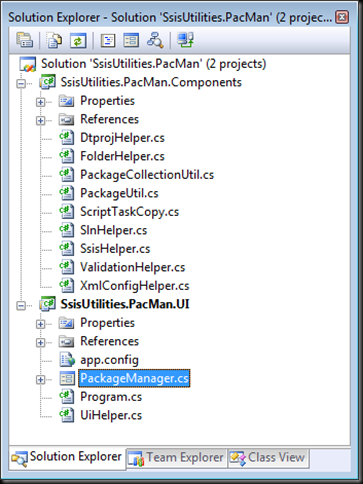
Figure 11

The Components project implements a small set of classes that encapsulate access to objects in the SSIS .NET object model. The PackageUtil and PackageCollectionUtil classes are the two most significant ones, as we'll see later on.

PacMan UI:

The PacMan UI is exceptionally simple.[1] At the top of the form there are four options for selecting the scope of operations for whatever work is going to be performed - a single package, a single Visual Studio project, a Visual Studio solution containing one or more projects, or a file system folder containing multiple subfolders and packages. At the bottom of the form there is a set of tabs; each tab contains data entry controls for initiating a specific operation that will be performed on the packages that are in scope.
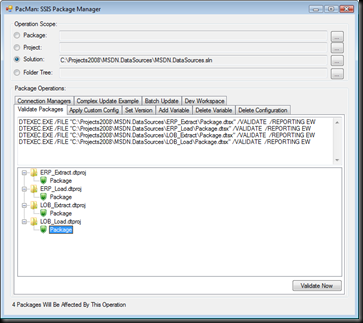
Figure 10 

PacMan Components:

As mentioned above, the two main classes in the Components project are the PackageUtil and PackageCollectionUtil classes.

The PackageUtil class is essentially a thin wrapper around a Microsoft.SqlServer.Dts.Runtime.Package object. The PackageUtil class exposes a Package object through its SsisPackage property, and also exposes a set of properties and methods that make manipulating the package more straightforward.

The PackageCollectionUtil class is a List of PackageUtil objects, along with a set of properties and methods for manipulating the packages in the List.

When an operation scope is selected through the PacMan UI, an instance of the PackageCollectionUtil class is created and stored in the class-level packages variable which is in scope and available anywhere within the PacMan UI.

Most interesting scenarios in PacMan revolve around enumerating the packages collection and doing something[2] with each of the packages it contains.

Using PacMan:

The basic pattern of using PacMan goes something like this:

  1. Get the PacMan code from CodePlex and open it in Visual Studio.
  2. Add your own code to PacMan. You can do this either by adding a new tab to the UI or reusing an existing tab. There is an existing "Dev Workspace" tab that I use for experimenting or for one-off efforts when I don't want to be bothered building a UI for what I'm working on.
  3. Feel good about accomplishing so much with so little effort.

Ok, so it may not be quite that simple all the time, but that's all I can think of right now. The nice thing is that the packages collection takes care of most of the hard work - all you need to do is worry about working on a single package at a time and PacMan does the rest of the work.

PacMan Use Case Example 1:

A typical example of using PacMan may look like this. The code below is used to rename a connection manager in all selected packages:

private void buttonSample_Click(object sender, EventArgs e)
{
    string oldName = "LocalHost.AdventureWorksDW";
    string newName = "AWDW";

    foreach (PackageUtil p in packages)
    {
        if (p.SsisPackage.Connections.Contains(oldName))
        {
            p.SsisPackage.Connections[oldName].Name = newName;
        }
    }
    packages.Save();
}

It doesn't get much simpler than that, does it? Imagine trying to reliably rename objects across a project or solution that contained dozens or hundreds of packages.

PacMan Use Case Example 2:

Some operations may require more code that what was shown above. For example, I recently needed to review a set of several hundred packages to ensure that there were no duplicate package IDs. To do this I updated the PackageCollectionUtil class to add a GetPackageIDs method that returns a SortedDictionary collection of the package IDs and the names of the packages that use them. The code looks like this:

public SortedDictionary<string, List<string>> GetPackageIDs()
{
    SortedDictionary<string, List<string>> ids =
        new SortedDictionary<string, List<string>>();

    foreach (PackageUtil package in this)
    {
        string id = package.SsisPackage.ID;
        if (!ids.ContainsKey(id))
        {
            // New key - add a new dictionary
            ids.Add(id, new List<string>());
        }
        // either way, add the package path
        ids[id].Add(package.PackageFilePath);

    }
    return ids;
}

Then, in the UI code, I could simply call this method and update a TreeView to display the results to the user:

private void buttonEnumerateIDs_Click(object sender, EventArgs e)
{
    if (packages != null)
    {
        SortedDictionary<string, List<string>> ids =
            packages.GetPackageIDs();
        BuildPackageIdTreeView(ids);
    }
}

private void BuildPackageIdTreeView(SortedDictionary<string, List<string>> packageIDs)
{
    treeViewPackageIDs.Nodes.Clear();
    foreach (KeyValuePair<string, List<string>> id in packageIDs)
    {
        if (!checkBoxShowOnlyDuplicates.Checked || id.Value.Count > 1)
        {
            // add a node for the ID
            TreeNode newNode = treeViewPackageIDs.Nodes.Add(id.Key);
            // add a child node for each package
            foreach (string packagePath in id.Value)
            {
                newNode.Nodes.Add(packagePath);
            }
            newNode.Expand();
        }
    }
}

Summary:

As you can see, PacMan provides a framework for developers to more easily perform operations on groups of packages. Those developers will still need to write code, but the scope and complexity of the code should be significantly reduced.

Please expect to see a few more PacMan-focused posts in the days and weeks ahead. There are some features I showed off at TechEd that can probably use some additional explanation, so now that I've laid the framework for further discussion, I can start work on those posts.

In the meantime, if you have any questions, comments or suggestions on PacMan, please feel free to post them here or to the discussion forum on the PacMan site on CodePlex. I can't guarantee that I'll respond to each one in a timely manner, but I'll do my best. Enjoy!


[1] I was going to write "ugly" here, because I know what it looks like. A UI designer I'm not.

[2] Yes, I suppose this goes without saying, as doing nothing is not a particularly interesting scenario, but the "something" in question up to the developer.

Saturday, June 14, 2008

SSIS on 64-Bit Windows

I've just returned home from the TechEd 2008 conference in Orlando - what an amazing two weeks this was. Even though the conference ended only yesterday, it already seems vaguely unreal, as if it were too much fun to have been real.[1]

But while I was having fun at TechEd, members of the SSIS team were hard at work[2] writing about one of my favorite topics: SSIS deployment. And since 64-bit deployments was such a large portion of my second breakout session, it seems like synchronicity[4] that both Douglas Laudenschlager and Matt Masson both blogged on the topic as well in the last few days. Check here to see Douglas' excellent post about considerations when using SSIS on 64-bit machines, and here to see Matt's follow-up about how the SQL Server Integration Services job step type in SQL Server Agent (just introduced in SQL Server 2008 RCO!) now provides the option to use the 32-bit SSIS runtime. That's pretty cool. I doubt I'll be using this and giving up DTEXEC any time soon, but it's a good step forward for 64-bit deployments.

Side note: Expect another post or two about SSIS deployment in the next few days. I realized on the flight home that I neglected to mention a few important considerations during that breakout session, so once I've had the time to remind my family who I am, I'll fill in the gaps here. Stay tuned!


[1] Although I am pretty sure it really was real. Otherwise I'll need to come up with an alternate theory about where all these t-shirts came from.

[2] Now I know why I didn't see these guys at the show...

[3] BIN-450: SQL Server Integration Services Deployment Best Practices

[4] Or perhaps some other Police song